


Whether you’re dusting off your equipment for the high season, or tucking it away for winter, it’s important to make sure your batteries are handled properly to avoid performance issues. Follow these steps to ensure your equipment is ready to hit the road when the time comes!
How to Get Speed-Macs & Work Zone Location Markers (WZLM) Ready for Spring Deployments
1 – Charge Your Battery
Make sure your unit’s battery is fully charged. While solar panels effectively harvest solar energy and keep your units running, they work to maintain, not recharge, your equipment’s battery levels.
If your battery is low or depleted, it will need to be recharged before redeployment. You can either charge a single unit using a Ver-Mac arrow board charger (which has the same connector) or charge many units simultaneously by using the Ver-Mac charging station.
 |
|
Charging station (part number: SPEED-MAC CS) – charges up to 12 Speed-Macs or WZLMs |
If you are charging your unit for the first time, please follow these steps:
- Make sure you have the lock and other parts that were shipped with the casing.

- Carefully place the cables into the case before closing.

2 – Test for One Week Before Deploying
Yes, it’s a pre-deployment deployment! Turn on your Speed-Mac or Work Zone Location Marker by pressing the button pictured below. Then, test the unit in your yard for one week. This will allow you to detect any issues before they are placed in work zones. Monitor your unit in JamLogic to make sure the voltage and charging levels are normal.
 |
|
On-Off Button |
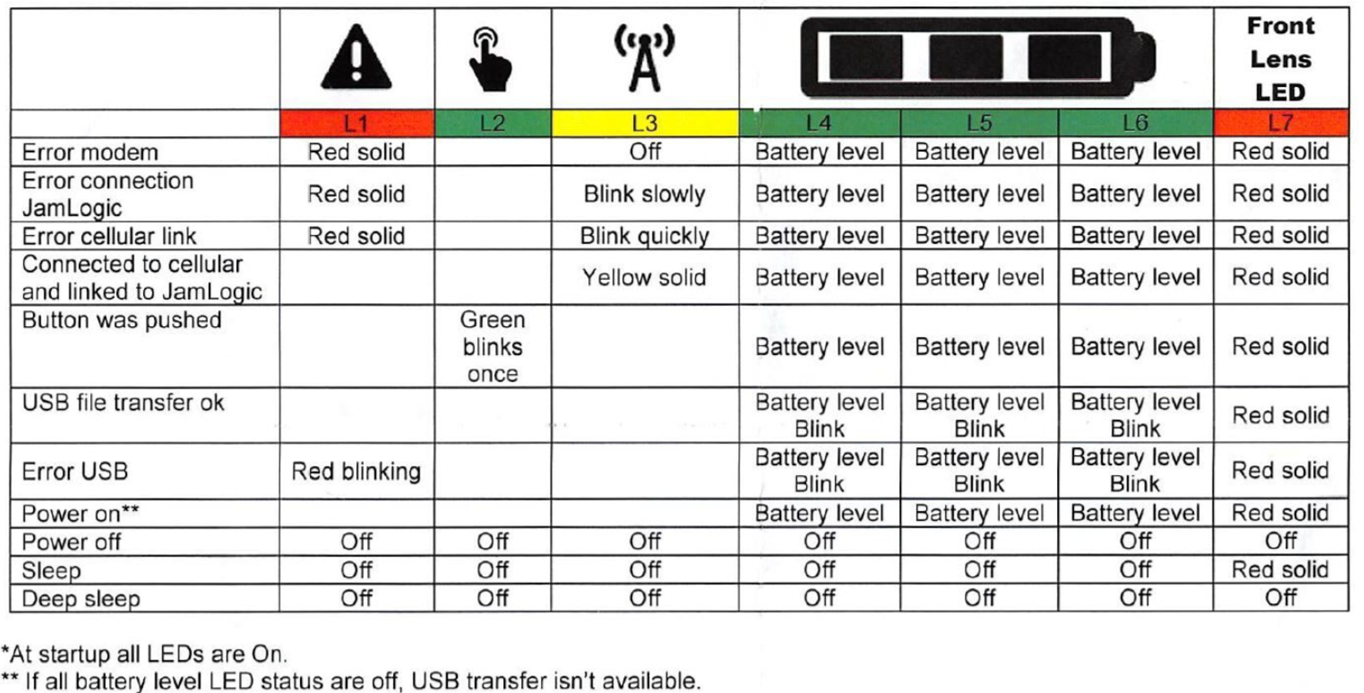
You can also monitor your LED patterns during the test period.
|
Speed-Mac & Work Zone Location Marker LED Behavior Grid |
 |
3 – Deploy in the Work Zone
Once the battery has been charged and the unit has been tested for one week, your work zone location marker or Speed-Mac is ready to be deployed in your work zone per your user manual’s instructions.
When your equipment is on the road, you can monitor your unit’s location, battery level, and more in JamLogic.
How to Store Your Speed-Mac or Work Zone Location Marker: 6 Essential Steps
After a season of hard work, your unit is ready for storage, but certain measures are essential to maintain its battery health and system reliability.
1. Fully Charge the Unit Before Storage
Be sure to charge your battery before placing your Speed-Mac or Work Zone Location Marker in storage. Storing batteries in a low-charge state for extended periods can shorten battery life and performance.
2. Disconnect the Battery for Long-Term Storage
If your unit will not be used for more than 3 months, disconnect the battery by opening the casing base up (like when first deployed) and disconnecting the internal battery.
Leaving the battery connected may cause it to slowly discharge. If the battery remains discharged for an extended period, this may negatively impact its long-term capacity and performance.
3. Store Units in a Cool, Dry Environment
Always store Speed-Macs and work zone location markers units in a cool, dry, and well-ventilated location.
Avoid storing equipment in areas that are:
- Subject to excessive humidity or moisture
- Near ignition sources or heat
4. Prevent Battery Short Circuits
Do not store batteries loosely in boxes or drawers where they may come into contact with metal objects. This can cause short circuits or battery damage. Always ensure batteries are stored safely and securely.
5. Recharge Batteries Periodically
If Speed-Mac or work zone location marker batteries are stored for extended periods, it is recommended to recharge them periodically to maintain battery health.
Long periods without charging may reduce the battery’s ability to recover full capacity.
6. Follow Battery Safety Guidelines
When handling Speed-Mac batteries:
- Only charge batteries using the Speed-Mac Charging Station (SPEED-MAC CS)
- Be careful not to puncture or damage batteries
If you need to dispose of your battery:
- Do not dispose of batteries in regular garbage
- Follow local battery disposal regulations
Frequently Asked Questions
Can I keep my Speed-Macs or Work Zone Location Markers outside in the yard, when they’re not in use?
Yes, but make sure the solar panel is facing south, and that they are stored in an area that gets lots of sunlight. Avoid shadows from closely placed devices, trees, buildings, etc.
When Speed-Macs or Work Zone Location Markers are not in use for extended periods of time, what is the best practice to minimize indoor storage needs?
Fully charge them with the Speed-Mac or WZLM heads disconnected from the vertical panels. Be sure to also disconnect the internal battery (opposite of step “a” when charging for the first time) in the base of each head and just store the heads indoors on a shelf. Be sure not to mix them up with similar warning light/beacon products.
If I am having an issue with a particular unit, what information does your support department need from me to investigate things from their end?
Locate the “IMEI” number and the Serial Number of the unit in question. Also, verify in which JamLogic organization the device can be located. This will save time and minimize email exchanges.