


Discover our common applications
- Connected Arrow Boards
- Work Zone Location Markers
- Work Zone Speed Management
-
Connected Worker Safety Technology
How Does Worker Presence Detection Improve Safety?
Workers are the most vulnerable part of any work zone. With more than 850 fatalities and 41,000 injuries recorded in work zones in 2024, taking proactive steps to improve safety is more critical than ever. Worker presence technology enhances safety by automatically:
- Alerting motorists via Waze & other platforms before they reach workers
- Lowering the speed limit on digital speed signs
- Displaying warning messages before the work zone
- Activating warning beacons on signage
- Informing stakeholders of work zone activity


Benefits of Connected Worker Safety Technology

Proactive Safety
- Waze alerts cut through distracted driving & warn drivers to exercise caution.
- Warning messages on digital signs reach drivers who do not use apps.
- Lower speed limits help motorists slow down before reaching workers.
Advance warnings & alerts

Real-time Visibility
Accurate field information
Government agencies and other stakeholders can be informed via the Connected Work Zone (CWZ) data feeds, informing mobility decisions and responses.

Reliable Records
Actionable data
Access worker presence records to support accountability, planning, and automated speed enforcement solutions.

Leverage Existing Signage
Enhance already-deployed devices
Worker Presence technology complements existing equipment, adding a new layer of intelligence that automatically reacts when workers are exposed to traffic.

Automate Work Zone Management
No manual intervention needed
Once configured, the system automatically activates safety measures exactly where and when needed. No risk of forgetting to activate the signage.
Part of Ver-Mac's Connected Ecosystem
The Connected Worker Module connects to JamLogic and becomes part of Ver-Mac’s connected ecosystem.


Connected Worker Technology Brochure
View a summary of how worker detection can increase safety and efficiency in your work zones.

Frequently Asked Questions
What is a Connected Worker Module?
The Connected Worker Module is a compact device that a worker slips into their vest pocket. It measures 4 5/8 X 3 1/8 inches and weighs 4.4 ounces (125g).
This small but mighty device is the next step in connected work zones, helping to improve worker safety, automating work zone equipment signage in geofenced work zones, communicating work zone status to government agencies, and more.

How does the Connected Worker module protect the privacy of the workers who wear it?
The Connected Worker module is designed to record your location only when you are inside a worksite that has been pre-marked with geotags. Even if you are wearing the module on your way home after your shift, your location will not be recorded or shared. Furthermore, the technology does not allow the module to be linked to the worker wearing it. Location data is therefore anonymous.
What if my work zone is not geofenced? Can I use the Connected Worker Module?
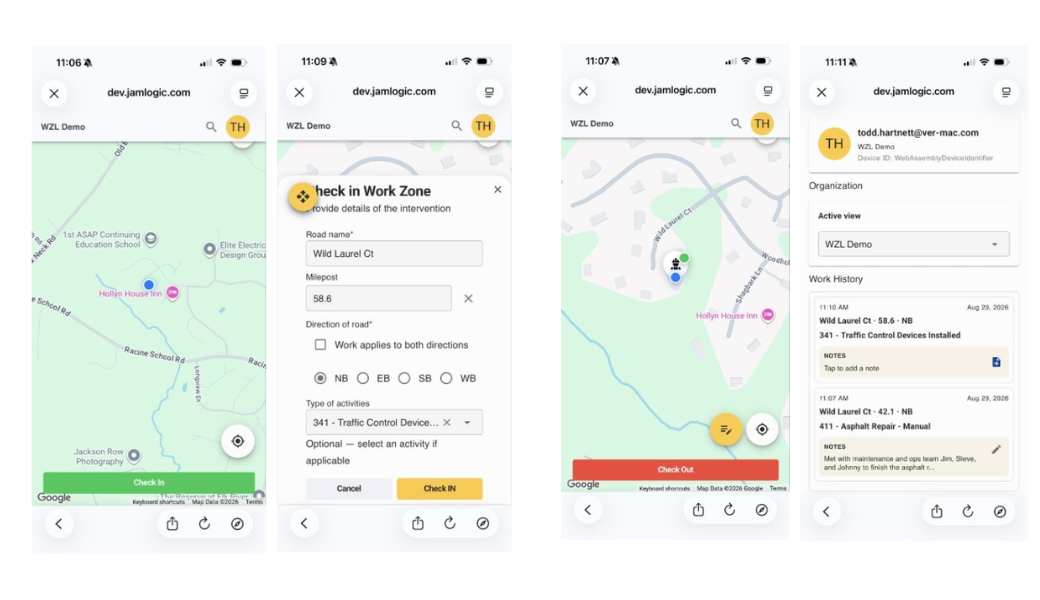
You need a geofenced work zone to use the Connected Worker Module. If your work zone is not geofenced, you can use Ver-Mac's Work Zone Live app to indicate your presence online.
This can trigger advance warnings to motorists via Waze and other navigation systems, adding a layer of safety.
The Work Zone Live app also allows you to select the type of work you are doing for tracking and reporting purposes.
Learn more about the Work Zone Live app.
Is the Connected Worker Module easy to use?
It is very easy to use. It’s as simple as charging it after each shift and slipping it into a safety vest pocket.
The rest happens automatically when the worker who is wearing the device steps into the geofenced work zone.
Ver-Mac’s connected ecosystem activates, making workers digitally visible on Waze, displaying predetermined signage, lowering speed limits, and connecting to the CWZ data feeds. No risk of forgetting to manually log in or out.
What if I have any questions or need support when using the Connected Worker Module?
We’re here to support you and answer any questions you may have.
To learn more about the Connected Worker Module, please contact our connected solutions experts at connected.solutions@ver-mac.com
If you already have the Connected Worker Module and have technical questions, please contact Ver-Mac’s Support Team.
Is a vest included with the Connected Worker Module?
No, the Worker Presence Module is supplied as a standalone product, and can be slipped into the pockets of any safety vest.
Which speed sign or message sign can I use with the Connected Worker Module?
It is recommended to use the following speed signs with the Connected Worker Module:
- Speed Wizard
- Work Zone Digital Speed Limit Sign
- Any portable changeable message sign can be used with the Worker Presence Technology.
Make workers visible. Automate safety.
Protect crews, inform key stakeholders, and automate safety measures.
